SSilpuAI Studio+
Render free
Gold Coast · two ways in: Render it yourself or Win the project · for builders
AI Rendering · Gold Coast, Queensland

Gold Coast renders that catch the water, the towers and the light — in seconds, not days.

Feed SilpuAI Studio+ your SketchUp, ArchiCAD or Revit model — or just a screenshot — and it renders a magazine-grade image on the spot. It reads the way the Coast actually builds: rendered masonry and frameless glass, canal-front homes opening to the Broadwater, Surfers high-rise, subtropical beach houses and timber homes on hinterland acreage. From A$1.50 a render — no studio queue, no week-long wait.

Free to try — no card. Then A$1.50 a render, credits never expire.

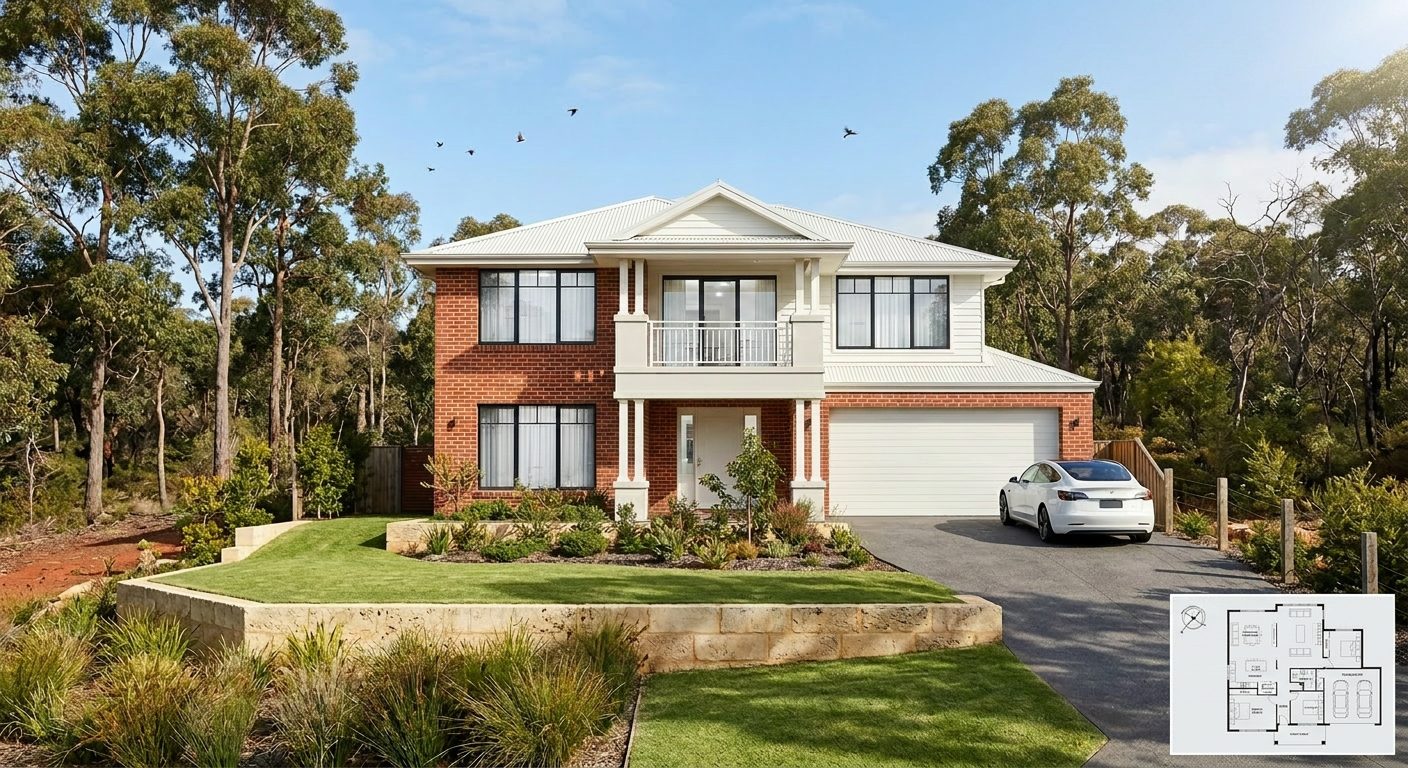
A photoreal SilpuAI Studio+ render of a Gold Coast home
Your model → photoreal, exactly as drawn.SILPUAI STUDIO+
Built by a practising designer Works with SketchUp · ArchiCAD · Revit — or any screenshot A$1.50 a render · credits never expire Renders exactly as modelled
Three steps

From your model to a finished render before your coffee's cold.

01

Upload your model

Drag in a model view — or send it straight from the free SketchUp, ArchiCAD or Revit plugin with one click.

02

Pick a look

Photoreal, golden hour, dusk, or a concept style. Set the sun, the time of day, the mood — no scene setup.

03

Generate

A magazine-grade render in seconds. Relight, restyle, add interiors or landscape, and download. Priced per render.

Outsourcing vs. rendering it yourself

Why Gold Coast practices render the everyday work in-house.

Keep the specialist studio for a flagship tower's hero marketing shot. For concept passes, design options, client sign-off and canal-front listings — the volume that quietly eats your week — render them yourself in seconds.

 Outsourcing (the old way)SilpuAI Studio+ YOU
Turnaround3–7 daysSeconds
Cost per imageA$200–A$850A$1.50
RevisionsPaid, another waitInstant, as many as you like
Design accuracyDepends on the briefLocked to your model
Who's in controlSomeone else's queueYou, at your desk in Gold Coast

It renders your design — not its imagination.

Generic AI invents — wrong rooflines, a phantom balcony, a pool that drifts off the boundary, finishes nobody specified. Built by a practising designer, Studio+ locks geometry and materials to your model: your rendered masonry stays rendered, your Colorbond roof stays Colorbond, your frameless glass balustrades and stacking sliders stay exactly where you drew them, and the canal frontage, pontoon and cantilevered pool deck stay put over the water — accurate enough to put in front of a client or lodge with the City of Gold Coast.

“Render exactly as modelled” isn't a setting. It's the whole point.

Built for Gold Coast work

What Gold Coast designers & builders render with it.

Canal-front homes Broadwater & pontoons Surfers Paradise towers Rendered masonry & glass Subtropical beach houses Hinterland acreage Louvres & breezeways Alfresco & pool decks
Pricing

Pay for what you render. Nothing else.

A$1.50
per render
Free to try — no card. Just sign in and render.
  • Credits never expire — buy a top-up, use it whenever.
  • Free plugins for SketchUp, ArchiCAD & Revit.
  • Clean, unwatermarked output on paid renders.
  • Relight, restyle, interiors & landscape included.
  • Pro tier for teams and higher volume.
Questions

3D rendering in Gold Coast — answered.

How much does 3D rendering cost in Gold Coast?

Gold Coast studios typically charge A$200–A$850 an image with a three-to-seven-day turnaround, and more again for a full set. SilpuAI Studio+ is A$1.50 per render, generated in seconds, with credits that never expire — so a whole page of canal-front and skyline options costs a few dollars, not a few hundred.

Will the render stay true to my drawings?

Mostly — geometry and materials are locked to your model, so it renders your rendered masonry, your glass balustrades and your Colorbond rather than inventing them the way generic AI image tools do. That said, AI can still drift, so always check the render against your drawings before you rely on it for a client presentation or a development application to the City of Gold Coast.

How long does an architectural render take?

Seconds. Upload your model or send it straight from the plugin, choose a look — golden hour over the Broadwater, or dusk with the Surfers towers lit — and generate. Iterate as many times as you like without re-queuing or re-quoting.

Do I still need a rendering studio on the Gold Coast?

For a flagship tower's hero marketing image, a specialist studio can still be worth it. For concept passes, design options, client sign-off and real-estate listings — the everyday volume — render them yourself in seconds for a fraction of the cost. It's an online tool, so there's no local booking and no brief to write.

Which software does it work with?

Free plugins for SketchUp, ArchiCAD and Revit send your view with one click. You can also upload any 3D-model screenshot, a photo of an empty room, or a product shot. No render farm and no heavy scene setup — it runs online, wherever you are.
Render your first Gold Coast project free.

No card, no studio queue. Sign in, upload a model, and watch it turn photoreal — glass, water and light — in seconds.

Start rendering