SSilpuAI Studio+
Render free
Nelson · two ways in: Render it yourself or Win the project · for builders
AI Rendering · Nelson, New Zealand

Photoreal Renders for Nelson's Hillside Homes and Timber Baches

Nelson catches more sun than anywhere else in New Zealand, and its houses are built to prove it — timber-clad forms stepping up hillside sites toward Tasman Bay, decks angled for the light, honest bach-style detailing that doesn't try too hard. SilpuAI Studio+ turns your SketchUp, ArchiCAD or Revit model into a photoreal render that holds that character: real timber grain, real sun angle, real site. Upload a model or a screenshot and get a result back in seconds, not days, for NZ$1.60 per render.

Free to try — no card. Then NZ$1.60 a render, credits never expire.

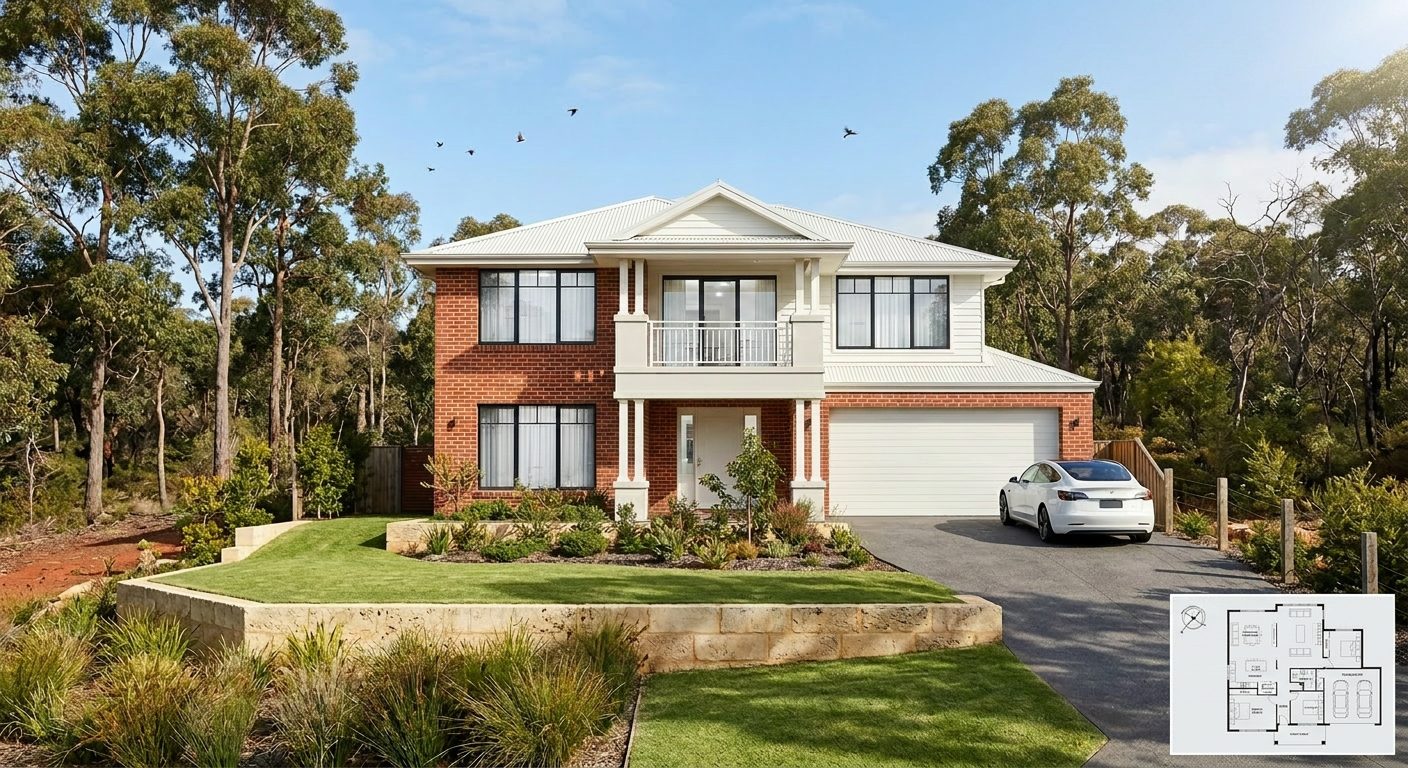
A photoreal SilpuAI Studio+ render of a Nelson home
Your model → photoreal, exactly as drawn.SILPUAI STUDIO+
Built by a practising designer Works with SketchUp · ArchiCAD · Revit — or any screenshot NZ$1.60 a render · GST included · credits never expire Renders exactly as modelled
Three steps

From your model to a finished render before your coffee's cold.

01

Upload your model

Drag in a model view — or send it straight from the free SketchUp, ArchiCAD or Revit plugin with one click.

02

Pick a look

Photoreal, golden hour, dusk, or a concept style. Set the sun, the time of day, the mood — no scene setup.

03

Generate

A magazine-grade render in seconds. Relight, restyle, add interiors or landscape, and download. Priced per render.

Outsourcing vs. rendering it yourself

Keep the studio for the hero shot. Render everything else yourself.

There's still a place for a specialist Nelson rendering studio — the hero shot for a listing on a Tasman Bay hillside, or the campaign image for a boutique Waimea development, where NZ$300–NZ$1,200 and a hand-crafted week of attention buys something genuinely bespoke. But most of what a design practice actually needs isn't that: it's the three options you render to test a hillside orientation before the client meeting, the building consent set that needs a clean elevation attached, the lifestyle-block concept out toward Abel Tasman that may never get built. That's volume work, and paying studio rates for it doesn't make sense. Render it yourself, and save the outsourced fee for the one image that has to stop someone mid-scroll.

 Outsourcing (the old way)SilpuAI Studio+ YOU
Turnaround3–7 daysSeconds
Cost per imageNZ$300–NZ$1,200NZ$1.60
RevisionsPaid, another waitInstant, as many as you like
Design accuracyDepends on the briefLocked to your model
Who's in controlSomeone else's queueYou, at your desk in Nelson

It renders your design — not its imagination.

Nelson's character comes from restraint — vertical timber board-and-batten holding its own against clear light, a hillside section that dictates every roof pitch and window head, decks and eaves doing real work to catch or shade the sun. Studio+ locks to the geometry and materials in your model rather than reinventing them, so a north-facing timber elevation on a Tasman Bay slope renders as the timber, sun angle and roofline you actually drew — not a generic beach-house stand-in. Like any AI tool it can still drift on fine detail over a long run, so always check a render against your model before it goes in front of a client or into a building consent submission.

“Rendered exactly as modelled — not reimagined.”

Built for Nelson work

Here's what Nelson designers and builders are putting through it week to week:

Sun-catching hillside Timber bach-style Tasman Bay outlook Board-and-batten cladding Abel Tasman lifestyle block Honest-material detailing Sun-angled decks Waimea Plains rural Craft-community character
Pricing

Pay for what you render. Nothing else.

NZ$1.60
per render, GST included
Free to try — no card. Just sign in and render.
  • Credits never expire — buy a top-up, use it whenever.
  • Free plugins for SketchUp, ArchiCAD & Revit.
  • Clean, unwatermarked output on paid renders.
  • Relight, restyle, interiors & landscape included.
  • Pro tier for teams and higher volume.
Questions

3D rendering in Nelson — answered.

How much does 3D rendering cost in Nelson?

A specialist rendering studio in Nelson typically charges NZ$300 to NZ$1,200 per image, with a 3 to 7 day turnaround. Studio+ renders your own model for NZ$1.60 per image, GST included, and it's free to try with no card required.

How accurate is the render to my actual design?

Studio+ works from your actual SketchUp, ArchiCAD or Revit model or screenshot, so wall lines, window positions and material choices come from what you drew, not a generic template. Like any AI process it can occasionally drift on fine detail over repeated edits, so treat every render as a strong first pass and check it against your model before a client sign-off or a building consent submission.

How long does a render take?

A render comes back in seconds, not the 3 to 7 days a studio needs. That means you can push through several building consent iterations — testing cladding, roof pitch or window options — in the time it used to take to get a single image back.

Which software does it work with?

Anything you already model in. SilpuAI reads SketchUp, ArchiCAD, Revit, Rhino and more — and if all you have is a viewport screenshot, that works too. No new plugin to learn, no export gymnastics.

Do I still need a Nelson rendering studio?

For the one image that has to carry a listing or a campaign — the hero shot of a hillside home over Tasman Bay — a specialist Nelson studio's hand-finished work still earns its fee. For everyday volume — concept options, client sign-offs, permit sets, listing photos for the lifestyle blocks out toward Abel Tasman — render it yourself for NZ$1.60 a time and keep the studio budget for the shot that matters.
Render Nelson's next build before it's built.

Upload a model or a screenshot and see your own Nelson project rendered in seconds. No card required to try it, and every render stays priced at NZ$1.60, GST included — however many hillside options, timber finishes or consent iterations it takes to get there.

Start rendering